WEEK 4

Writing the Specification

Week 4 · Requirements as the Contract, part 2

WEEK 4

Monday: from features to use cases

The unit your agent builds against

WEEK 4

From feature to use case

flowchart LR
  BO["BO-PERF-instructor-efficiency"] --> FEAT["FEAT-performance-tracking"]
  FEAT --> WAR["Area: WAR"]
  FEAT --> EVA["Area: EVA"]
  EVA --> UC["UC-EVA-submit-evaluation"]
  UC -.-> LATER["Design, code, test: week 8"]
Key point

Every arrow is a link you can follow, forward and backward. That is traceability.

WEEK 4

Your first trace

Feature Business objectives Use case areas
FEAT-performance-tracking BO-PERF-instructor-efficiency, BO-PERF-student-participation WAR, EVA
Trace: feature to use case area
  • Every feature has at least one area.
  • Every area is reached by a feature.
WEEK 4

Four volunteers

The Shopper The online store The Fulfillment System The Billing System
Shopper The System Fulfillment System Billing System
a person the online store ships the order charges the card
WEEK 4

Use Case 01: Place an order

Actors Shopper, Fulfillment System, Billing System
Trigger The Shopper indicates to order the selected items.
Precondition The Shopper has selected the items.
Postconditions Placed, with a tracking ID and a delivery date. Or not placed, and the database is consistent.
WEEK 4

Main success scenario (1 of 2)

  1. The Shopper indicates to order the items that have already been selected.
  2. The System presents the billing and shipping information that the Shopper previously stored.
  3. The Shopper verifies the information and confirms that the existing billing and shipping information should be used for this order.
  4. The System presents the amount that the order will cost, including applicable taxes and shipping charges.
  5. The Shopper verifies the information and confirms that the order information is accurate.
  6. The System provides the user with a tracking ID for the order.
  7. The System submits the order to the Fulfillment System for evaluation.
  8. The Fulfillment System provides the System with an estimated delivery date.
  9. The System presents the estimated delivery date to the Shopper.
WEEK 4

Main success scenario (2 of 2)

  1. The Shopper indicates that the order shall be placed.
  2. The System requests the Billing System to charge the Shopper for the order.
  3. The Billing System confirms that the charge has been placed for the order.
  4. The System submits the order to the Fulfillment System for processing.
  5. The Fulfillment System confirms that the order is being processed.
  6. The System indicates to the Shopper that she has been charged for the order.
  7. The System indicates to the Shopper that the order has been placed.
  8. The Shopper exits the System.
WEEK 4

Extensions

  • 3a. The Shopper wants billing and shipping information different from what is stored. Also applies if nothing is stored, or the Shopper has no account.
    • 3a1. The Shopper indicates that this order shall use alternate billing or shipping information.
    • 3a2. The Shopper enters billing and shipping information for this order.
    • 3a3. The System validates the billing and shipping information.
    • 3a4. The use case continues.
  • 5a. The Shopper discovers an error in the billing or shipping information in her account.
    • 5a1. The Shopper indicates that the billing and shipping information is incorrect.
    • 5a2. The Shopper edits the billing and shipping information in her account.
    • 5a3. The System validates the billing and shipping information.
    • 5a4. The use case returns to step 2 of the normal flow.
WEEK 4

Run it again: the Shopper cancels

  • 10a. The Shopper determines that the order is not acceptable (perhaps the estimated delivery date) and cancels the order.
    • 10a1. The Shopper requests that the order be cancelled.
    • 10a2. The System confirms that the order has been cancelled.
    • 10a3. The use case terminates.
Ask the room

Step 6 already issued a tracking ID. Step 7 already told the Fulfillment System. What does cancelling have to undo?

WEEK 4

What is a use case?

The system's behavior under various conditions, as it responds to a request from one of the stakeholders, called the primary actor.

Key point

Use cases are fundamentally a text form. You just performed one.

WEEK 4

Why use cases?

Ask users what they do, not what features they want.

Users can review a use case, because it is written in the words of their business.

WEEK 4

You will meet user stories

"As a student, I want to submit my weekly activity report, so that my instructor can see my work."

  • Card: the sentence
  • Conversation: where the detail lives
  • Confirmation: the acceptance tests
WEEK 4

INVEST

  • Independent
  • Negotiable: not an explicit contract; the details are co-created during development
  • Valuable
  • Estimable
  • Small
  • Testable
WEEK 4

Your agent does not negotiate

The agent

It builds what is written, and fills the gaps without asking.

Key point

Plan with user stories. Build against use cases.

The product owner told the agent, "we'll work out the details later." The agent shipped before later arrived.

WEEK 4

Find the right level

Ask the room

Which of these are valid use cases?

  • Get a student loan
  • Set up a promotion for Black Friday
  • Handle a return for a customer
  • Log in
  • Move a piece on the game board
WEEK 4

Three tests

Test Ask Fails it
Boss Is your boss happy you did this all day? Log in
Elementary business process One person, one sitting, a business event, value added? Get a student loan: too big
Size More than one step in a sequence? Move a piece
WEEK 4

What is in a use case?

Part In Place an order
Primary actor: starts it, to reach a goal The Shopper
Actors: anyone or anything with behavior Fulfillment System, Billing System
Scope: the system under design The online store
Pre- and postconditions Items selected; placed, or database consistent
Main success scenario: nothing goes wrong Steps 1 to 17
Extension: a condition, then its handling 10a, the Shopper cancels
WEEK 4

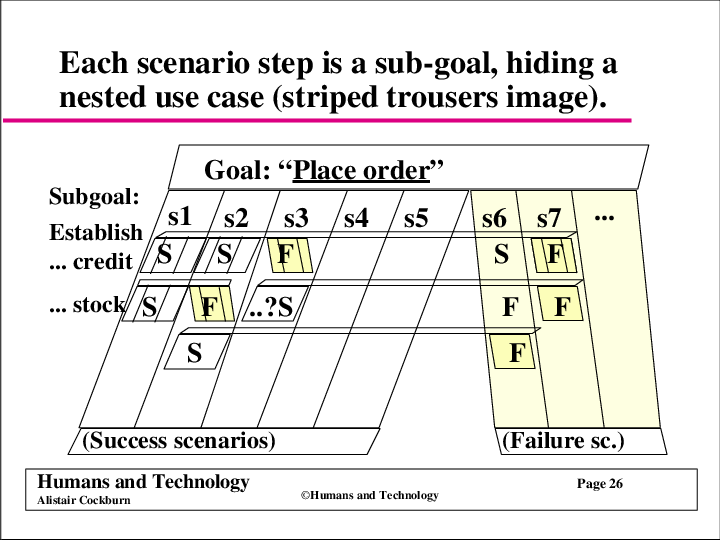
Every step is a subgoal

Each scenario step is a subgoal hiding a nested use case, drawn as striped trousers

A pair of trousers

The goal is the belt. Each stripe is one scenario: success down one leg, failure down the other.

WEEK 4

Our template adds five things

  • UC-<AREA>-<slug> identifier
  • Trigger
  • Business Rules, by BR-* identifier only
  • Associated Information: data fields and validation
  • Frequency of Use
WEEK 4

Writing use cases

Robert Martin: "It shouldn't take longer than 15 minutes to teach someone how to write a use case." This lecture is fifty minutes. Writing a good one takes the rest of the semester.

WEEK 4

Save your energy

  • 1. Actors and goals: the use case list
  • 2. Main success scenario, for the ones you pursue now
  • 3. Failure conditions, all of them, before handling any
  • 4. Failure handling
Key point

Pause after each level. Each costs more than the last.

WEEK 4

Three kinds of action step

  • Interaction between two actors: "Clerk enters basic loss information."
  • Validation protecting a stakeholder: "System confirms there are no competing claims."
  • Internal change for a stakeholder: "System saves, and triggers acknowledgement be sent to agent."
Ask the room

Place an order has plenty of interactions and two validations. Where is its internal change?

WEEK 4

Guideline 1: simple grammar

Subject ... verb ... direct object ... prepositional phrase.

Key point

The system ... deducts ... the amount ... from the account balance.

WEEK 4

Guideline 2: who has the ball?

At every step one actor has the ball, and that actor is the subject of the sentence.

Ask the room

At the end of the sentence, who has the ball now?

"Kicked. Passed. Scored." Great match. Who won?

WEEK 4

Guideline 3: a bird's eye view

Not this

Get ATM card and PIN.

Deduct amount from account balance.

This

The customer puts in the ATM card and PIN.

The system deducts the amount from the account balance.

WEEK 4

Guideline 4: move the process forward

  • "User hits tab key." Why?
  • To get to the address field. Why?
  • She has to enter her name and address first.
  • "User enters name and address."
Key point

A main success scenario rarely needs more than nine steps.

Ask the room

Place an order had seventeen. Which would you merge?

WEEK 4

Guideline 5: intent, not movements

Before

  1. System asks for name.
  2. User enters name.
  3. System prompts for address.
  4. User enters address.
  5. User clicks "OK".
  6. System presents user's profile.

After

  1. User enters name and address.
  2. System presents user's profile.

Requirements that mention the OK button are how a voice assistant ends up with an OK button.

WEEK 4

Guideline 6: a reasonable set of actions

Too much in one step

  1. The customer enters the order number. The system detects a winning number, registers the winner, emails the sales manager, congratulates the customer, and explains how to collect the prize.

Split at the natural breaks

  1. The customer enters the order number.
  2. The system detects that it matches the winning number of the month.
  3. The system registers the winner, emails the sales manager, and congratulates the customer.
WEEK 4

Guideline 7: "validates", not "checks whether"

Before

  1. The system checks whether the password is correct.
  2. If it is, the system presents the available actions for the user.
  3. If it is not, ...

After

  1. The system validates that the password is correct.
  2. The system presents the available actions for the user.

The system checks whether the password is correct. The system is now very well informed, and nothing has happened.

WEEK 4

Guideline 8: mention timing only when it matters

Usually the timing is obvious. Say it only when the requirement depends on it.

WEEK 4

Guideline 9: "user has System A kick System B"

Not good

User hits FETCH, at which time the system fetches the data from system B.

Better

  1. User has the system fetch the data from system B.
WEEK 4

Guideline 10: "do steps x-y until condition"

  1. User selects an item to buy, marks it for purchase.
  2. System adds the item to the customer's shopping cart.

Customer repeats steps 3-4 until indicating that they are done.

  1. Customer purchases the items in the shopping cart.
WEEK 4

Standard mistakes: "Register for Courses"

  1. Display a blank schedule.
  2. Display a list of all classes in the following way: The left window lists all the courses in the system in alphabetical order. The lower window displays the times the highlighted course is available. The third window shows all the courses currently in the schedule.
  3. Do
  4. Student clicks on a course.
  5. Update the lower window to show the times the course is available.
  6. Student clicks on a course time and then on the "Add Course" button.
  7. Check if the Student has the necessary prerequisites and that the course offering is open.
  8. If the course is open and the Student has the necessary prerequisites, add the Student to the course. Display the updated schedule showing the new course. If no, put up a message, "You are missing the prerequisites. Choose another course."
  9. Mark the course offering as "enrolled" in the schedule.
  10. End do when the Student clicks on "Save Schedule."
  11. Save the schedule and return to the main selection screen.
Ask the room

How many of the ten guidelines does this break?

WEEK 4

Corrected: "Register for Courses"

System: Course Enrollment System · Goal level: User Goal

  1. Student requests to construct a schedule.
  2. The system prepares a blank schedule form.
  3. The system gets available courses from the Course Catalog System.
  4. Student selects up to 4 primary and 2 alternate course offerings.
  5. For each course, the system verifies that the Student has the necessary prerequisites, adds the Student to the course, marking Student as "enrolled" for that course in the schedule.
  6. When the Student indicates the schedule is complete, the system saves it.

Extensions

  • 1a. Student already has a schedule: System brings up the current version of the Student's schedule for editing instead of creating a new one.
  • 1b. Current semester is closed and next semester is not yet open: System lets Student look at existing schedules, but not create new ones.
  • 3a. Course Catalog System does not respond: The system notifies the Student and the use case ends.
  • 5a. Course full or Student has not fulfilled all prerequisites: System disables selection of that course and notifies the Student.
WEEK 4

Extensions: where the defects live

An agent handed a use case with no extensions: "Understood. Nothing can go wrong."

WEEK 4

A checklist for extensions

  • Another way to succeed: "Clerk uses a shortcut code"
  • The actor does it wrong: "Invalid password"
  • The actor does nothing: "Password time-out"
  • Every "validates": "Invalid account number"
  • A supporting actor fails: "Response time-out"
  • An expected internal failure: "Cash dispenser jams"
  • An unexpected internal failure: "Corrupt transaction log"
  • Too slow: "No response within 5 seconds"
WEEK 4

Guideline 11: the condition says what was detected

Not this

Customer forgets PIN.

This

PIN entry time-out.

Invalid PIN · Network is down · The customer walked away (time-out) · Cash did not eject properly

The system has no sensor for regret.

WEEK 4

An extension is a miniature use case

  • Trigger: the extension condition
  • Goal: complete the use case goal, or recover from the failure just encountered
  • Body: action steps, and possibly extensions of its own
WEEK 4

Guideline 12: indent condition handling

Extensions

  • 2a. Insufficient funds:
    • 2a1. System notifies customer, asks for a new amount.
    • 2a2. Customer enters new amount.
WEEK 4

Our style guide

https://github.com/Washingtonwei/use-case-style-guide

Key point

Your use cases are reviewed against it. Give it to your agent when you ask for a review.

WEEK 4

Your turn: review a real use case

Project Pulse, UC-EVA-submit-evaluation (link in Slack)

  • Alone, 5 minutes: list every defect.
  • With your agent, 4 minutes: give it the use case and the style guide.
  • Compare the two lists.
WEEK 4

Two lists

Ask the room

What did you find that the agent missed? What did it find that you missed?

Key point

Where your review and the agent's disagree is where to look.

WEEK 4

They are requirements. They are not all of the requirements.

Use cases specify

What the system does, including when it fails.

They do not specify

Interfaces, data formats, business rules, formulas, constraints, quality attributes.

WEEK 4

Before Friday

  • No class Wednesday.
  • Friday: the rest of the specification, in this room. There is no studio this week.
  • Bring: your use case list (actors and goals only) and your feature-to-area table.
  • Tomorrow, 10:00 AM: peer evaluation, in Project Pulse.
WEEK 4

Friday: the rest of the specification

Everything a use case does not say

WEEK 4

A pile of information

A senior manager gathered sixty employees for a day-long workshop on his company's next flagship product. Facilitators, brainstorming, ideas everywhere. He compiled it all into a hundred-page document and called it a requirements specification.

Nothing in it was classified, organized, or analyzed. The real requirements were in there somewhere. No developer could have found them.

Key point

Collecting is not specifying.

WEEK 4

The software requirements specification (SRS)

The functions the system must provide, its characteristics, and the constraints it must respect, described completely enough to say how the system behaves under various conditions, and how well.

  • One per project, in docs/requirements/software-requirements-specification.md.
  • Our template follows Wiegers and Beatty. The international standard is ISO/IEC/IEEE 29148.
  • Kept current all term, like every other file in docs/.
WEEK 4

It is not written for you

Reader Takes
Project managers Schedule, effort, resources
Developers What to build
Testers Test plans and procedures
Maintenance What each part is supposed to do, years later
Doc writers Manuals and help screens
Training Course material
Legal Whether it complies with the law
The agent

The eighth reader is your agent, and it cannot walk down the hall. Good enough for a teammate is not good enough for an agent.

WEEK 4

The specification is a hub, not a book

Section Holds Lives
2.4, 2.5 Constraints; assumptions and dependencies Here
5.1 Use cases Link to use-cases.md
5.2 Requirements no use case contains Here
6 Business rules Link to business-rules.md
7, 8 Data; external interfaces Here
9 Quality attributes Here
Key point

A fact in two documents means one of them is wrong, and it is the one you are reading.

WEEK 4

Constraints (2.4)

CO-vue-spring-stack

The client in Vue.js. The backend in Java on Spring Boot.

CO-ferpa

Comply with FERPA when storing and transmitting student educational records.

Key point

Not a feature. It removes an option you would otherwise have had.

WEEK 4

The one nobody asks

Key point

Who maintains this after you graduate, and what do they already know how to run?

Constraint discovered in week 14: the client's laptop cannot run Docker.

WEEK 4

The assumption nobody wrote down (2.5)

Project Pulse's specification lists DE-gmail-smtp: email notifications depend on the Gmail SMTP integration.

It does not list the assumption underneath: that mail from a Gmail sender reaches a TCU inbox. TCU's filter can junk it. That is why you were told to add the address to your safe senders, in a course where a late peer evaluation is not accepted.

Key point

An unwritten assumption fails exactly like a written one. Nobody planned for it.

WEEK 4

Every dependency and risk ends somewhere

Dependency

DE-llm-service: the AI features depend on an external LLM service.

AVL-llm-degradation: while it is down, everything else keeps working.

Risk

RI-scalability: heavy use in large capstone programs may stress the infrastructure.

SCA-cohort-load: about 70 students, up to 100 concurrent editors.

Key point

A risk ends in a requirement that mitigates it, or in an acceptance with a reason.

WEEK 4

Not everything is a use case (5.2)

FR-NOT-weekly-reminder

On a course section's weekly due day for activity reports or peer evaluations, the system shall email each student in that section a reminder listing what is due and when.

Key point

No student asked for it. It is still a requirement.

WEEK 4

EARS: five shapes

Shape Opens with
Ubiquitous The <system> shall <response>
Event driven When <trigger>
State driven While <in a state>
Optional Where <feature is included>
Unwanted behavior If <precondition>, then
Key point

The shape teams skip: If.

WEEK 4

"It says I haven't taken a training class in over a year."

Jackie, a chemist, needs more phosgene for her dyes. The chemical tracking system will not accept her request, so she calls Tim, the product owner.

Tim: Contoso requires an annual refresher class in the safe handling of hazardous chemicals. Corporate policy, based on OSHA regulations. The system just enforces it.

Key point

Is that a requirement of the software?

WEEK 4

A property of the business (6)

BR-evaluation-submission-window

A student may submit a peer evaluation only for the previous week, and has that one week to complete it. Later edits included.

The course's rule.

Project Pulse enforces it. Change the policy and the software is wrong.

Key point

The rule existed before the software, and survives the software being switched off.

WEEK 4

Every rule has a source

  • Who says so, and where it is written down.
  • A syllabus section. A policy number. A regulation with a citation. A sentence your client said, with the date.
  • No source? It is not a rule yet. It is an OPEN-ISSUES.md entry.

"Must comply with all applicable regulations." Which ones? "The applicable ones."

WEEK 4

One more link in the chain

Trace: business rule to what enforces it
  • Every rule is enforced by something.
  • Every requirement that cites a rule cites one that exists.
WEEK 4

Data requirements (7)

A requirement document's status is DRAFT, SUBMITTED, RETURNED, or ACCEPTED.

Submitted goes to returned or accepted. Accepted is read-only.

The agent

Invented precision: a plausible field list reads exactly like a real one.

WEEK 4

Mars Climate Orbiter, September 1999

One team's ground software reported thruster impulse in pound-force seconds. The navigation software, built by another team, expected newton-seconds, as the interface specification required.

Every trajectory correction was off by a factor of 4.45. The spacecraft flew too low into the Martian atmosphere. A $327.6 million mission was gone.

Key point

Each side worked. The failure was in the space between them.

WEEK 4

External interfaces (8)

SI-llm-proxy-only

The browser never calls the LLM service directly, only through the server's AI proxy.

SI-import-allowlist

Uploads accept PDF and PowerPoint, up to 25 MB by default. Nothing else.

Key point

Hardware interfaces: "No hardware interfaces have been identified." That sentence is information.

WEEK 4

"I'm practically shouting over the fan and I'm getting hoarse."

Clarice is teaching in the new training room. She calls Sam, the maintenance supervisor: is the heating broken?

Sam: it is working normally. The right airflow, temperature held within half a degree from 60 to 85, every programming feature requested. Nobody said anything about noise, so I bought the cheapest unit that met the requirements.

Key point

Every requirement met. Room unusable.

WEEK 4

An adjective is not a requirement (9)

What they say

"The dashboard should be fast."

PER-report-load

Return the dashboard and report views within 500 ms at the 95th percentile, under the load of SCA-cohort-load.

Key point

A number and a way to measure it.

WEEK 4

Where did this number come from?

The agent

Ask an agent for quality attributes and you get 99.9% uptime and a 200 ms response. Plausible, well-formed, conventional, traceable to nothing.

  • Your client said it.
  • You measured it.
  • Your team decided it, and can defend it.
Key point

There is no fourth source.

WEEK 4

Your turn: where did this number come from?

  • Your agent drafts section 9 of your specification, from your brief and your notes.
  • Label every number client, measured, decided, or nobody knows.
  • Every "nobody knows" becomes an OPEN-ISSUES.md entry, or gets deleted.
WEEK 4

Before your next team meeting

  • Agree your use case list, then split: four write one use case in full, one owns business-rules.md, one owns constraints and quality attributes.
  • Both tables in docs/traceability.md, with their checks.
  • Send the use case list to your client.
  • Your TA checks all of it at the start of studio, Friday Sep 25.

Writing the Specification

→ space PgDn
Next step or slide
← PgUp
Back
↓ S
Skip to the next slide
O
Overview of all slides
N
Speaker notes
B
Black the screen
Ctrl+P
Print / PDF handout, one slide per page